Choose the right clock location.
Print the company time-clock QR or a job-site code. The QR identifies the company or job; the employee’s personal clock PIN identifies whose time record is being accessed.
 ASSETSAND AXLESCompany sign-in ↗
QR EMPLOYEE TIME CLOCK & HOURS TRACKING
Replace another disconnected time sheet with clock records in your company workspace. Employees open a company or job-site QR link and use their own clock PIN. Managers review the entries before exporting approved time.
First calendar month free. Card required. Cancel before renewal. Any applicable tax is shown at checkout.
Print the company time-clock QR or a job-site code. The QR identifies the company or job; the employee’s personal clock PIN identifies whose time record is being accessed.
After checking their status, an employee selects the appropriate work assignment and clocks in. At clock-out, they can record unpaid break minutes. Actions use the time the server receives them, so internet access is needed.
Managers filter time by period or employee, review entries, and export approved hours. Hourly, salary, and per-job pay profiles, overtime settings, and employer burden support labor-cost estimates.
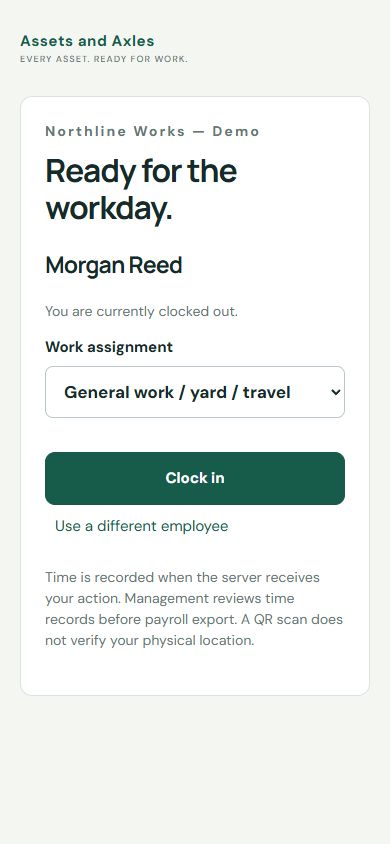
Warehouse crews, service technicians, construction teams, farm employees, bar and restaurant staff, and production workers can use the same clock flow. Recorded approved time off also helps management plan employee availability.
This is not GPS or physical-presence verification. Labor figures are planning estimates, not payroll, wage-law advice, or profit. Final wages, deductions, taxes, PTO pay, and paychecks belong in your payroll system.
Explore 64 practical uses →EXPLORE THE DETAILS
EVERY ASSET. READY FOR WORK.
One monthly company subscription. Unlimited team logins. No per-user charges or feature add-on fees for the included tools.
First month free, then $9.99/month.
Card required. Cancel before renewal.